Google has written down, field by field, what its conversational surfaces need to know about a product, and the answers go in a feed most merchants already run.
The width had a field
In the last Brief, The better shoe lost the recommendation, a live shopping agent passed over the highest-rated shoe in a small test category five times out of five. The Meridian Arc's widths, drop and stability class sat in an image. The agent could not read them, so it recommended the shoe that stated its equivalents as text.
Google's own documentation describes the fix. In the Merchant Center help article for conversational attributes, the example value for the variant option field is a shoe width and a size: narrow, 8. The field the Arc needed already exists, in a specification Google publishes, inside a feed most retailers already send.
That is the useful part. For once, a platform has not left merchants to infer what it wants. It has named the fields.
Six fields, three jobs
Conversational attributes are six optional additions to the Merchant Center product data specification. Google says they help AI systems and conversational agents understand a product's nuances, on surfaces like AI Mode in Search, and that they also feed traditional search. They do three jobs.
| Answer the shopper’s questions | |
|---|---|
question_and_answer | Up to 30 question and answer pairs per product, 1,000 characters each, 10,000 in total |
document_link | Links to PDFs such as manuals and assembly instructions |
| Describe the product family | |
item_group_title | One title for a product sold in several variants |
variant_option | Every property that tells variants apart, as name and value pairs |
| Place the product | |
related_product | Typed relationships to other items, such as accessory or required part |
popularity_rank | The product’s popularity as a percentile of the merchant’s own inventory |
Two details in the specification matter more than the list. The question and answer page says the field is primarily intended for conversational experiences such as AI Mode. And it has no Schema.org equivalent. This is not markup Google will find on your page. It reaches Google only if you send it.
The risk is low. Google recommends adding the fields through a supplemental data source matched on product ID, and states that including them does not change the approval status of products already submitted.
What to fill first
Six fields across a full catalog is a project. Six fields in the right order is a sequence, and most of the content already exists somewhere in the business.
Start where the comparison happens. variant_option and item_group_title carry the properties a shopper chooses between: width, size, capacity, finish. Google requires every variant in a group to use the same option names, so if one carries width and size, they all do. This is the Arc's field. Fill it for the categories where shoppers compare on specification before anything else.
Write the answers your support team already gives. question_and_answer should come from customer service transcripts, return reasons and the questions on your own product pages, not from a copywriter. Google's rules are strict and sensible: product facts only, no prices or dates, no lists of search terms, and no repeats of what the description, product highlight or product detail fields already say.
Link the documents, then stop. If manuals and spec sheets exist as PDFs, document_link points Google at them, and Google says it will extract answers from those documents itself. Do not duplicate in question and answer pairs what a linked manual already holds.
Type the relationships. related_product takes a relationship type, an identifier type and an identifier for each link. A required part and an accessory are different claims, and an agent assembling a complete purchase needs to know which is which.
Rank last, and honestly. popularity_rank is your own sales data expressed as a percentile of your own inventory. It is a self-report, so derive it from a defined window and refresh it on a schedule. A rank nobody maintains drifts away from the truth it was meant to state.
What the feed does not fix
The variant option specification carries one requirement that changes how this whole exercise should be read. The product details on your landing page must match the values you put in the feed.
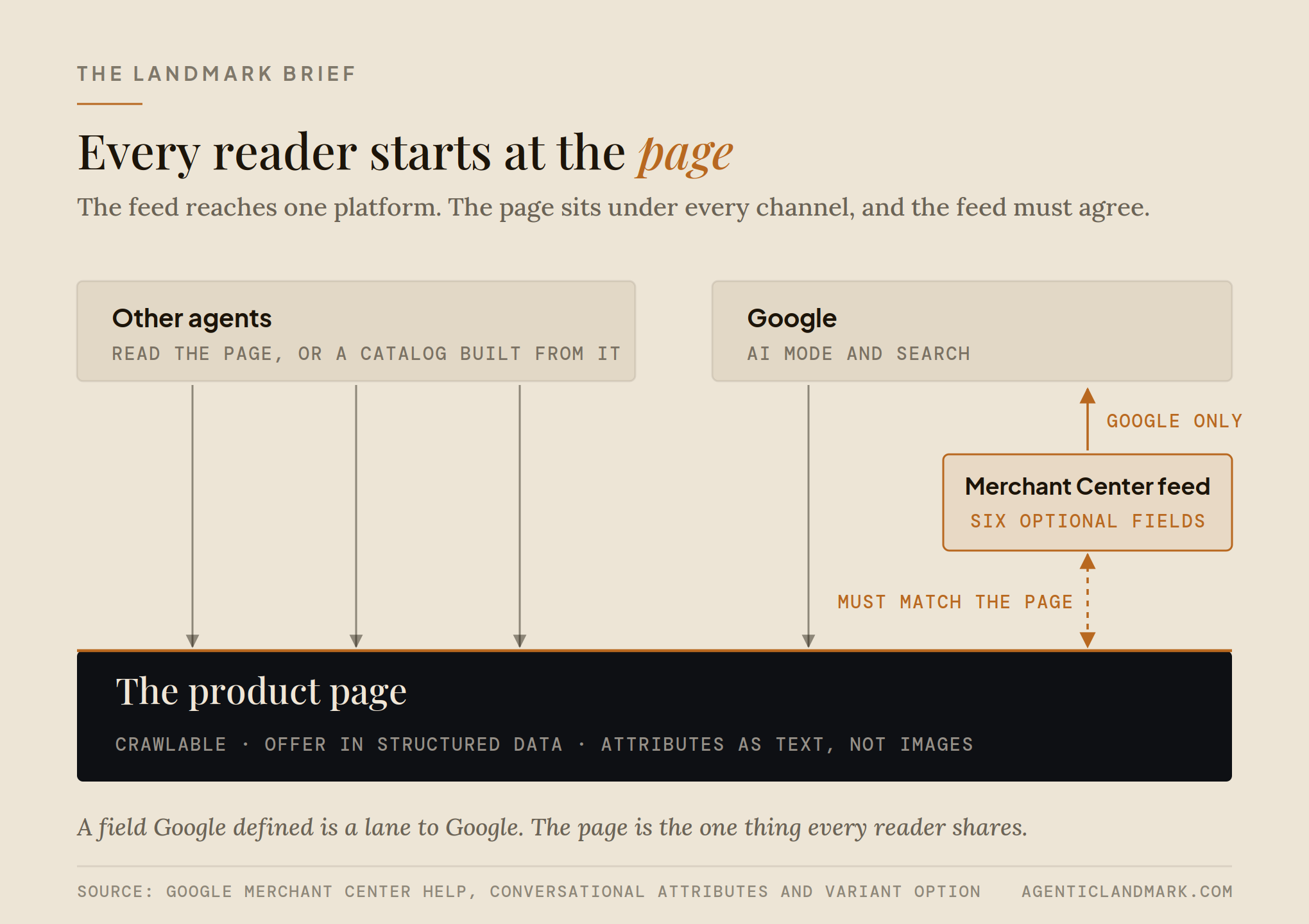
So the feed is not a way around the page. The Arc could have declared its widths to Google in a supplemental feed, and its page would still have shown them only as an image. Google would be holding a claim the page could not support, and every other agent would still be reading the page.
That second point is the larger one. Conversational attributes reach one platform. ChatGPT, Perplexity and the agents arriving through Shopify Catalog do not read your Merchant Center feed. They read your public product pages, the catalog your commerce platform syndicates for you, or a feed built to their own specification. A field Google defined is a direct lane to Google and to nobody else.
The order follows from that. The page is the shared floor: crawlable, stating its offer in structured data, carrying its attributes as text rather than as pictures. Every channel reads it. The feed is a lane one platform built on top of that floor. Agent Catalog Read examines the floor, page by page, because a lane is only as good as the page it has to match.
Before the peak
Most of agent readiness is inference: work out what an agent needs, then build it. This is the rare exception. The questions are written down, with field names, character limits and worked examples, and the answers can go live through a supplemental feed without touching the primary one.
The sequence for the next six weeks is short. Make the comparison attributes on your highest-revenue pages readable as text, so the page can support what the feed will claim. Add variant options for those products. Load the questions your support team answers every week. Link the manuals you already have.
The Arc's width had a field all along. It also needed a page that said the same thing in words.